LLM Routers Compared: LiteLLM vs Portkey vs OpenRouter in 2026
TL;DR
A practical comparison of LLM routing tools - LiteLLM, Portkey, and OpenRouter - covering cost management, fallbacks, caching, and when to use each for production AI applications.
Direct answer
LLM Routers Compared: LiteLLM vs Portkey vs OpenRouter in 2026
A practical comparison of LLM routing tools - LiteLLM, Portkey, and OpenRouter - covering cost management, fallbacks, caching, and when to use each for production AI applications.
Best for
Developers comparing real tool tradeoffs before choosing a stack.
Covers
Verdict, tradeoffs, pricing signals, workflow fit, and related alternatives.
Last updated: June 24, 2026
Official Sources
| Source | What it covers |
|---|---|
| LiteLLM Documentation | Unified API for 100+ LLMs, proxy server setup, routing strategies, fallbacks, and cost tracking |
| LiteLLM GitHub | Open-source codebase with 22k+ stars, provider implementations, and configuration examples |
| Portkey AI Gateway | Enterprise gateway with guardrails, semantic caching, and observability features |
| Portkey Gateway GitHub | Open-source gateway supporting 1600+ models with fallbacks and load balancing |
| OpenRouter Documentation | Unified API for hundreds of models with automatic fallbacks and cost-based routing |
| OpenRouter Pricing | Model-specific pricing with provider comparison and availability status |
| Vercel AI Gateway | Managed gateway pattern for model access, observability, and provider routing |
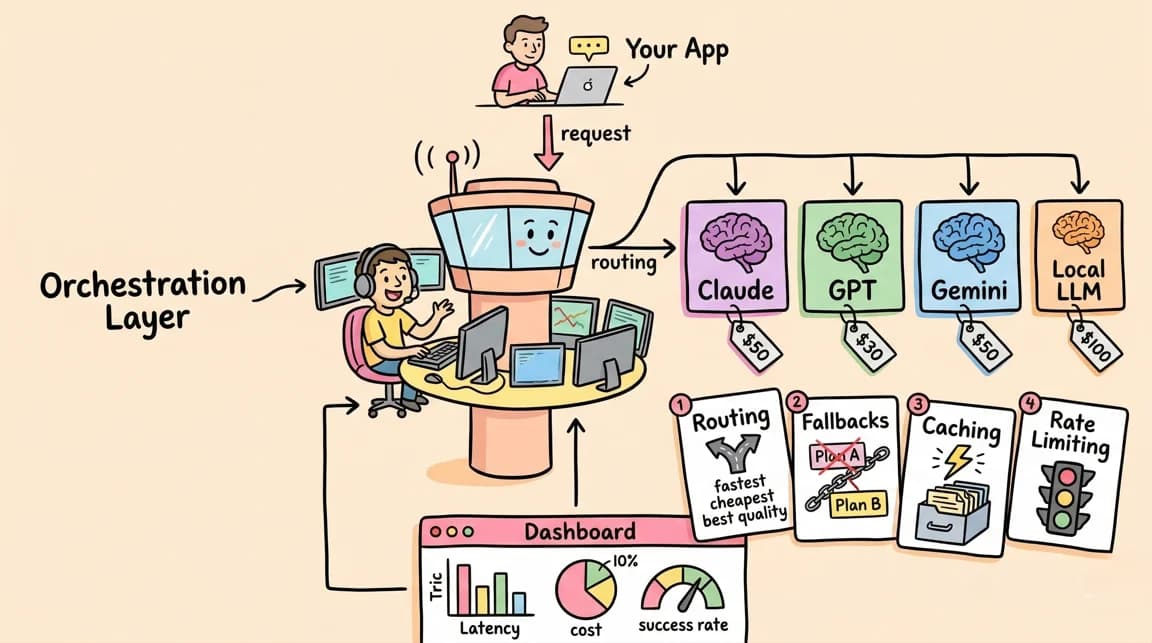
LLM costs add up. A single agent workflow hitting Claude Opus can burn through API credits faster than most teams expect. The standard response is model routing - picking the right model for each task, falling back when providers fail, and tracking spend across projects.
Three tools dominate this space: LiteLLM, Portkey, and OpenRouter. They solve similar problems differently. Here is when to use each.
If you want the higher-level infrastructure view first, read Models.dev makes model routing feel like infrastructure and AI model routing as the orchestration layer. If you already know you need practical configs, jump to model routing recipes that cut AI spend.
The Core Problem
Every production AI application eventually needs:
- Multi-provider access - using Claude for reasoning, GPT for specific tasks, open-source models for cost-sensitive work
- Fallbacks - when OpenAI is down, route to Anthropic; when that fails, route to Azure
- Cost tracking - knowing how much each feature, user, or project is actually spending
- Load balancing - distributing requests across rate limits and quotas
- Caching - not paying twice for identical prompts
You can build this yourself. Most teams eventually wish they had not.
The newer term to watch is AI gateway. A router usually decides where a model request goes. A gateway often adds auth, observability, rate limits, caching, policy, and billing control around that route. LiteLLM, Portkey, OpenRouter, Vercel AI Gateway, and Envoy AI Gateway overlap because production teams increasingly want both surfaces in one place.
LiteLLM: Open-Source Proxy Server
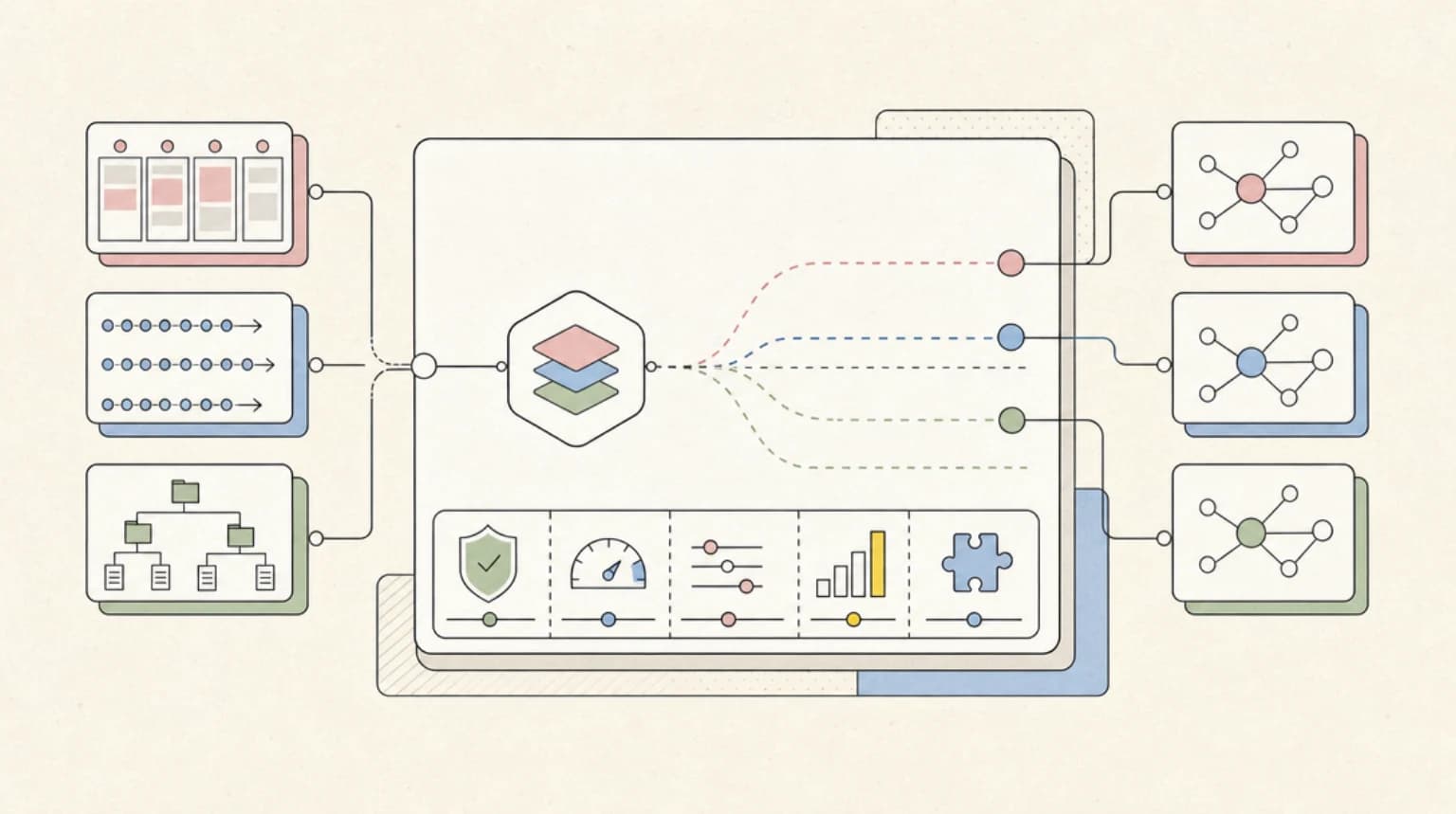
LiteLLM is a Python SDK and proxy server that gives you an OpenAI-compatible interface to 100+ LLM providers. You deploy it yourself - either as a library in your code or as a standalone proxy server.
How It Works
Configure models in YAML:
model_list:
  - model_name: gpt-4
    litellm_params:
      model: openai/gpt-4
      api_key: os.environ/OPENAI_API_KEY
    tpm: 40000
    rpm: 500

  - model_name: gpt-4  # Same name = fallback
    litellm_params:
      model: azure/gpt-4
      api_key: os.environ/AZURE_API_KEY
      api_base: os.environ/AZURE_API_BASE
    tpm: 80000
    rpm: 800

router_settings:
  routing_strategy: usage-based-routing
  fallbacks: [{"gpt-4": ["azure/gpt-4"]}]

litellm_settings:
  num_retries: 3
  request_timeout: 10
  context_window_fallbacks: [{"gpt-4": ["gpt-3.5-turbo-16k"]}]
Then call it like OpenAI:
from openai import OpenAI

client = OpenAI(
    api_key="your-litellm-key",
    base_url="http://localhost:4000"
)

response = client.chat.completions.create(
    model="gpt-4",
    messages=[{"role": "user", "content": "Hello"}]
)
Routing Strategies
LiteLLM supports multiple routing approaches:
- simple-shuffle - round-robin across deployments
- usage-based-routing - weighted by TPM/RPM capacity
- latency-based - prefer faster providers
- lowest-cost - route to cheapest available
Cost Tracking
The proxy logs spend per request and aggregates by model, user, or team. You get visibility into which workflows are expensive before the bill arrives.
When to Use LiteLLM
LiteLLM fits teams that:
- Want full control over their infrastructure
- Need to self-host for compliance or security
- Are comfortable deploying and maintaining a proxy server
- Want to modify the routing logic (it's open source)
The tradeoff is operational overhead. You deploy it, monitor it, and scale it yourself.
LiteLLM is strongest when model routing is part of your platform engineering layer. Pair it with a registry or pricing source, then write the routing policy like infrastructure. That is the same pattern behind Envoy AI Gateway 1.0: the router becomes shared production plumbing, not an SDK detail buried in one app.
Newsletter
Get the weekly deep dive
Tutorials on Claude Code, AI agents, and dev tools, delivered free every week.
From the archive
AI Code Attribution Needs Defect Forensics, Not Vibes
Jun 6, 2026 • 8 min read
Headroom: Compress Agent Tool Output Before It Reaches the LLM
Jun 6, 2026 • 8 min read
Security Agents Need Repro Harnesses, Not More Scan Prompts
Jun 5, 2026 • 9 min read
AI Agent Containment Needs a Capability Ledger
Jun 4, 2026 • 9 min read
Portkey: Enterprise Gateway
Portkey is a managed AI gateway focused on enterprise features - guardrails, semantic caching, and observability. It started as a hosted service and later open-sourced the gateway component.
How It Works
Portkey uses a configuration-based approach with nested strategies:
import { Portkey } from 'portkey-ai';

const config = {
  strategy: {
    mode: 'loadbalance'
  },
  targets: [
    {
      virtual_key: process.env.ANTHROPIC_VIRTUAL_KEY,
      weight: 0.5,
      override_params: {
        model: 'claude-3-opus-20240229'
      }
    },
    {
      strategy: {
        mode: 'fallback'
      },
      targets: [
        { virtual_key: process.env.OPENAI_VIRTUAL_KEY },
        { virtual_key: process.env.AZURE_VIRTUAL_KEY }
      ],
      weight: 0.5
    }
  ]
};

const portkey = new Portkey({
  apiKey: process.env.PORTKEY_API_KEY,
  config
});

const response = await portkey.chat.completions.create({
  messages: [{ role: 'user', content: 'Hello' }],
  model: 'gpt-4'
});
Semantic Caching
Portkey can cache semantically similar prompts, not just exact matches. This saves money when users ask slight variations of the same question:
{
  "cache": { "mode": "semantic" },
  "strategy": { "mode": "fallback" },
  "targets": [
    { "provider": "openai", "api_key": "..." },
    { "provider": "anthropic", "api_key": "..." }
  ]
}
Guardrails
The enterprise focus shows in features like:
- Input/output validation
- PII detection and redaction
- Content filtering
- Token budget enforcement
When to Use Portkey
Portkey fits teams that:
- Need enterprise compliance features
- Want semantic caching out of the box
- Prefer managed infrastructure
- Have budget for a commercial solution
- Need detailed observability without building it
The tradeoff is cost. Hosted Portkey is not free. The open-source gateway provides fallbacks and routing but not all enterprise features.
Portkey is strongest when the buying question is not only "which model is cheapest?" but "who can prove what happened?" That matters for regulated apps, internal copilots, and customer-facing workflows where guardrails, audit trails, and budget enforcement are part of the product requirement.
OpenRouter: Unified API Service
OpenRouter is a hosted service that provides access to hundreds of models through a single API endpoint. You do not deploy anything - you use their API like you would use OpenAI's, but with access to models from every provider.
How It Works
OpenRouter acts as a marketplace and router. You make API calls to OpenRouter, and they route to the underlying provider:
from openai import OpenAI

client = OpenAI(
    api_key="your-openrouter-key",
    base_url="https://openrouter.ai/api/v1"
)

response = client.chat.completions.create(
    model="anthropic/claude-3-opus",  # Use any provider
    messages=[{"role": "user", "content": "Hello"}]
)
Model Fallbacks
OpenRouter supports automatic fallbacks:
from livekit.plugins import openai

llm = openai.LLM.with_openrouter(
    model="openai/gpt-4o",
    fallback_models=[
        "anthropic/claude-sonnet-4",
        "openai/gpt-5-mini",
    ],
)
Or in their SDK:
const result = openrouter.callModel({
  models: ['anthropic/claude-sonnet-4.5', 'openai/gpt-5.2', 'google/gemini-pro'],
  input: 'Hello!',
});
Price-Based Routing
OpenRouter's default routing strategy prioritizes lowest-cost providers:
- Filter for stable providers
- Select from lowest-cost candidates
- Weight by inverse square of price
- Use remaining providers as fallbacks
You pay OpenRouter's price per model, which includes their margin. For some models, they add to the base price. For others, they offer competitive rates because of volume agreements.
When to Use OpenRouter
OpenRouter fits teams that:
- Want the simplest possible integration (one API key)
- Need access to many models without managing credentials
- Do not want to deploy any infrastructure
- Are okay with routing decisions being made by OpenRouter
The tradeoff is less control. You cannot customize routing logic, caching behavior, or fallback strategies beyond what OpenRouter provides. You also depend on their uptime.
OpenRouter is strongest when exploration speed matters more than owning the control plane. For a deeper OpenRouter-specific setup path, read OpenRouter in 2026: review, setup, and when model routing pays.
Comparison Matrix
| Feature | LiteLLM | Portkey | OpenRouter |
|---|---|---|---|
| Deployment | Self-hosted | Hosted or self-hosted | Hosted only |
| Open source | Yes (MIT) | Gateway yes, hosted no | No |
| Provider count | 100+ | 1600+ | Hundreds |
| Fallbacks | Yes, configurable | Yes, nested strategies | Yes, model list |
| Load balancing | Yes, multiple strategies | Yes, weighted | Yes, price-based |
| Semantic caching | No (simple caching only) | Yes | No |
| Cost tracking | Yes, per-request | Yes, with observability | Yes, dashboard |
| Guardrails | No | Yes | No |
| Custom routing | Full control | Config-based | Limited |
| Pricing | Free (self-hosted) | Free tier + paid | Per-token markup |
Decision Framework
Choose LiteLLM when:

- You have DevOps capacity to run a proxy server
- You need full control over routing logic
- Compliance requires self-hosting
- You want to avoid per-request fees
- You are comfortable with Python/YAML configuration
Choose Portkey when:
- You need enterprise features (guardrails, compliance, auditing)
- Semantic caching provides meaningful cost savings
- You want detailed observability without building it
- You have budget for a commercial product
- Your team prefers managed infrastructure
Choose OpenRouter when:
- You want the simplest integration path
- Managing API keys across providers is too much overhead
- You need access to niche or new models quickly
- Routing decisions do not need customization
- You are okay paying a margin for convenience
Hybrid Approaches
Some teams combine these tools:
- LiteLLM + models.dev: Use the models.dev registry to populate LiteLLM config with current model capabilities and pricing
- OpenRouter for exploration, LiteLLM for production: Test with OpenRouter's broad access, then move critical paths to self-hosted LiteLLM for cost control
- Portkey for enterprise, direct APIs for simple cases: Route production through Portkey, but hit Claude/GPT directly for low-volume internal tools
Cost Reality Check
The hidden cost in LLM routing is not the router - it is poor model selection.
A router that sends every request to Claude Opus when Haiku would suffice costs 30x more. A router without fallbacks loses availability when a single provider has issues. A router without cost tracking surprises you at month end.
The right tool is the one that makes model selection explicit and cost tracking automatic. Whether that is a self-hosted proxy, a managed gateway, or a unified API depends on your team's operational capacity and compliance requirements.
This is also why the routing conversation belongs next to pricing. A routing layer without current model prices is a fancy failover proxy. Tie it to AI coding tools pricing reality and actual usage reports before calling it an optimization.
The Take
Model routing is infrastructure now. As AI applications mature, the question shifts from "which model do I use?" to "how do I use the right model for each request, with fallbacks, at predictable cost?"
LiteLLM gives you full control and zero marginal cost, but requires operational investment.
Portkey provides enterprise-grade features and observability, but requires budget.
OpenRouter offers maximum simplicity and model access, but abstracts away control.
Pick based on your constraints. The wrong answer is not picking one at all.
Frequently Asked Questions
What is an LLM router and why do I need one?
An LLM router is a proxy layer that sits between your application and LLM providers. It handles multi-provider access (using Claude, GPT, and open-source models through one interface), automatic fallbacks when providers fail, cost tracking across projects, and load balancing across rate limits. You need one when your AI application grows beyond a single model - which happens faster than most teams expect.
How does LiteLLM differ from using OpenAI's API directly?
LiteLLM wraps 100+ LLM providers in an OpenAI-compatible interface. Instead of managing separate SDKs and API keys for each provider, you configure models in YAML and call them through one endpoint. LiteLLM also adds fallbacks, retries, cost tracking, and routing strategies that the native APIs do not provide. You deploy it yourself, which means operational overhead but no per-request fees.
Is Portkey worth the cost over free alternatives?
Portkey's value depends on whether you need its enterprise features. Semantic caching can reduce costs significantly for applications with similar queries. Guardrails (PII detection, content filtering, token budgets) matter for regulated industries. Observability surfaces are more polished than what you would build on LiteLLM. If you do not need these features, LiteLLM or OpenRouter may be more cost-effective.
Does OpenRouter add significant cost compared to direct provider APIs?
OpenRouter adds a margin to most model prices, but the markup varies. For some models, they offer competitive rates due to volume agreements. For others, you pay 10-20% more than direct access. The tradeoff is simplicity - one API key, one billing relationship, access to hundreds of models. Calculate whether that convenience is worth the margin for your usage volume.
Can I use multiple routers together?
Yes. Common patterns include using OpenRouter for exploration and model testing, then moving production traffic to self-hosted LiteLLM for cost control. Some teams route enterprise traffic through Portkey for compliance while keeping internal tools on direct APIs. The models.dev registry can populate any router's configuration with current model specs.
How do fallbacks actually work in production?
Fallback behavior varies by router. LiteLLM lets you define fallback chains per model name and configure retries, timeouts, and context-window-specific fallbacks. Portkey supports nested fallback strategies with weighted load balancing. OpenRouter accepts an array of models and tries each in order. The key is testing fallbacks before you need them - a misconfigured fallback that fails silently costs more than no fallback at all.
What about latency overhead from routing layers?
Self-hosted routers (LiteLLM) add minimal latency - typically single-digit milliseconds. Hosted services (Portkey, OpenRouter) add network round-trip time to their servers, usually 20-50ms depending on your location. For most LLM applications, this is negligible compared to model inference time. For latency-critical paths, self-hosting or direct provider access is preferable.
Should I build my own router instead?
Building a basic proxy is straightforward. Building one with proper fallbacks, retries, cost tracking, rate limit handling, caching, and observability takes months. Most teams underestimate the maintenance burden - every provider API change, new model release, or pricing update requires attention. Use an existing router unless you have specific requirements that none of them satisfy.
Sources
Read next
Models.dev Makes Model Routing Feel Like Infrastructure
The models.dev project is trending because AI teams need one boring source of truth for model specs, pricing, context windows, modalities, and tool support.
7 min readModel Routing Recipes: Practical Config Patterns to Cut AI Spend
A code-heavy field guide to model routing. Real, runnable-style configs for tiering tasks by complexity, routing simple work to open-weights, reserving frontier models for hard reasoning, building failover chains, and keeping prompt caches warm with OpenRouter, LiteLLM, and Factory Router.
11 min readAI Model Routing: Why the Orchestration Layer Is the Next Big Play Next to the Labs
A $500M accidental Claude bill and an open-weights model beating GPT-5.5 at one-sixth the cost point to the same conclusion: the margin is moving to the layer that decides when to use which model for what. Here is how routing and orchestration differ, and how to cut your model spend.
12 min readShare
Suggest an editSave
Developers Digest
Technical content at the intersection of AI and development. Building with AI agents, Claude Code, and modern dev tools - then showing you exactly how it works.
300+ videos30K+ GitHub stars50+ articles
Related Tools

Apps from Developers Digest
Developer ToolsIn Progress
Migrate
Beat the August 2026 Assistants API sunset. Paste old code, get Responses API.
View AppDeveloper ToolsIn Progress
Cost Tape
Watch your LLM spend tick up live, right in the editor.
View AppDeveloper ToolsIn Progress
Agent Workflow Hub
Queue and organize repeatable agent workflows before they become production automations.
View AppRelated Guides
Related Posts

7 min read
AI Models
Models.dev Makes Model Routing Feel Like Infrastructure
The models.dev project is trending because AI teams need one boring source of truth for model specs, pricing, context wi...
11 min read
pricing
Model Routing Recipes: Practical Config Patterns to Cut AI Spend
A code-heavy field guide to model routing. Real, runnable-style configs for tiering tasks by complexity, routing simple...

12 min read
AI Model Routing
AI Model Routing: Why the Orchestration Layer Is the Next Big Play Next to the Labs
A $500M accidental Claude bill and an open-weights model beating GPT-5.5 at one-sixth the cost point to the same conclus...
8 min read
AI Gateway
Envoy AI Gateway 1.0 Makes LLM Routing an Infrastructure Decision
Envoy AI Gateway 1.0 is production-ready. The useful question for builders is when an Envoy-based LLM gateway beats dire...
8 min read
ai-tools
OpenRouter in 2026: Review, Setup, and When Model Routing Pays
OpenRouter gives you one API key for 300+ models, automatic fallbacks, and intelligent provider routing. Here is what it...

12 min read
AI Coding
AI Coding Tools Pricing Comparison 2026
Complete pricing breakdown for every major AI coding tool. Claude Code, Cursor, Copilot, Windsurf, Codex, Augment, and m...

11 min read
Claude API
Prompt Caching in the Claude API: A Production Guide
Cut Claude API spend by up to 90% with prompt caching. Real numbers, TypeScript SDK code, and the gotchas Anthropic's do...

10 min read
Claude
Claude API Reliability: Error Handling Best Practices
The defensive patterns that keep Claude integrations alive in production. Retry shapes, backoff with jitter, circuit bre...

5 min read
Vercel AI SDK
Vercel AI SDK: Build Streaming AI Apps in TypeScript
The AI SDK is the fastest way to add streaming AI responses to your Next.js app. Here is how to use it with Claude, GPT,...

8 min read
AI Agents
AI Agent PMF Is a Cost Control Problem Now
AI coding agents have crossed from demo to daily workflow. The next bottleneck is not demand. It is cost attribution, bu...
Build with the member tools
Get Smarter About AI Dev
New tutorials, open-source projects, and deep dives on coding agents - delivered weekly.
One email per weekReal code, not theoryFree forever