Prompt Engineering for AI Coding Tools
TL;DR
Prompt engineering for coding is less about clever wording and more about task specs, repo context, constraints, examples, verification, and reviewable receipts.
Prompt engineering for coding tools has changed.
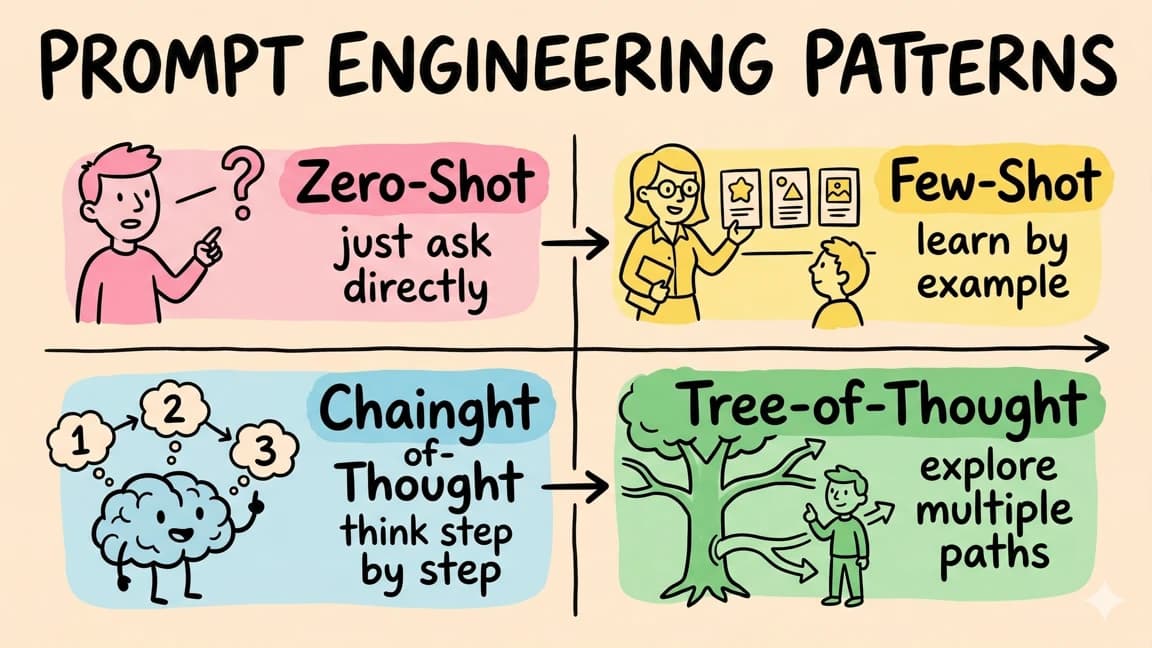
The old version was about clever phrasing: "act as a senior engineer," "think step by step," "write clean code." That still matters at the edges, but it is not where most gains come from anymore.
The useful version is task design.
A good prompt for Claude Code, Cursor, Copilot, Codex, or any serious coding agent defines the job, context, constraints, files, verification commands, and expected receipt. It turns "make this better" into a small, reviewable engineering contract.
Last updated: June 24, 2026
If you want the broader workflow, start with AI developer workflow in 2026, Claude Code tips, and why Claude Code won. This guide focuses on the prompt layer that makes those tools reliable.
The Prompt Is A Task Spec
Most bad AI coding output starts with an underspecified task.
"Build a settings page" is not a task spec. It is a wish. A coding agent still has to guess the stack, route, design system, data model, auth behavior, persistence layer, validation, loading states, error states, and tests.
A useful coding prompt has six parts:
- Context: what exists now.
- Goal: what should be true after the change.
- Constraints: what must not change.
- References: files or patterns to follow.
- Verification: commands or flows that prove success.
- Receipt: what the agent should report back.
That shape works across tools. Anthropic's prompt-engineering docs, GitHub Copilot's prompting guidance, Cursor's rules model, and OpenAI's prompt-engineering guide all point toward the same pattern: give the model the right context, make the objective explicit, and constrain the output.
A Good Coding Prompt
Here is the practical shape:
Goal:
Add a saved-projects API route.

Context:
This is a Next.js app using Convex for data and Clerk for auth.
Read app/api/users/route.ts and convex/schema.ts before editing.

Constraints:
- Match the route style in app/api/users/route.ts.
- Validate input with Zod.
- Do not introduce a new database client.
- Keep errors as JSON with proper status codes.
- Do not edit unrelated files.

Verification:
- pnpm typecheck
- pnpm test api

Receipt:
Return changed files, commands run, pass/fail status, and any risk left.
That prompt is not fancy. It is useful because it removes ambiguity.
Compare it with "make a projects API." The vague prompt can still work if the model guesses well. The task-spec prompt works because the agent has fewer guesses to make.
Put Stable Context In Files
Do not paste the same project context into every prompt.
Put durable rules in repo files:
CLAUDE.mdfor Claude Code project memoryAGENTS.mdfor multi-agent or cross-tool instructions- Cursor rules for Cursor-specific behavior
DESIGN.mdfor visual/product rules- task templates for common workflows
- skills or slash commands for repeated procedures
The Claude Code memory docs make this explicit: project memory belongs in files that load across sessions. Cursor rules solve a similar problem for editor workflows. The point is not the filename. The point is that stable context should be reviewable, versioned, and close to the code.
For Claude Code specifically, use the CLAUDE.md Generator, then improve it after every failure. If the agent repeatedly uses the wrong test command, put the right one in the file. If it keeps adding gradients or default exports, write that rule once.
This is why skills beat prompts for coding agents. A skill, rule file, or command is a prompt that survived review and became infrastructure.
Reference Files Beat Abstract Style Requests
Models are better at copying concrete patterns than obeying vague taste.
Bad:
Make this component match our style.
Better:
Create components/ProjectCard.tsx using the same prop style,
spacing, export pattern, and loading-state conventions as
components/ToolCard.tsx. Do not introduce a new card abstraction.
This works because the model can inspect an actual local pattern. It sees imports, class names, prop naming, layout density, error handling, and accessibility choices.
Reference files are especially useful for:
- route handlers
- form components
- data tables
- tests
- server actions
- design-system components
- markdown content
- API clients
For visual work, pair reference files with AI design slop detection and taste skills for design review. "Make it polished" is not a spec. "Match this component and pass these layout checks" is closer.
Newsletter
Get the weekly deep dive
Tutorials on Claude Code, AI agents, and dev tools, delivered free every week.
From the archive
Open Source Has a Bot Problem: Prompt Injection in Contributing.md
Mar 19, 2026 • 8 min read
Vercel AI SDK: Build Streaming AI Apps in TypeScript
Mar 19, 2026 • 5 min read
Web Dev Arena: How to Test AI Coding Models on Real Frontend Work
Mar 19, 2026 • 8 min read
What Is Claude Code? The Complete Guide for 2026
Mar 19, 2026 • 15 min read
Constraints Are More Important Than Tone
Tone words help less than constraints.
Instead of:
Write high-quality production code.
Use:
Constraints:
- No new dependencies.
- Keep the public API unchanged.
- Do not edit generated files.
- Use the existing auth helper from lib/auth.ts.
- Add tests for the failure case.
- Stop and ask if the migration changes existing rows.
Constraints prevent whole categories of bad output. They also make review easier because the reviewer can check whether the agent respected the contract.
This is the same discipline behind agent workspace contracts, permissions and rollback, and long-running agent harnesses. Good prompting is not separate from good agent operations. It is the front door.
Ask For Verification, Not Confidence
Never ask "does this work?" Ask for proof.
A useful prompt includes verification commands:
After editing, run:
- pnpm typecheck
- pnpm test components/project-card.test.tsx
- pnpm check:public-style

If any command fails, fix the issue once. If it still fails,
stop and report the failing output.
For UI work, ask for browser evidence:
Open the page at localhost:3000/projects.
Check desktop and mobile widths.
Capture a screenshot.
Report console errors and overlapping text.
For production-sensitive work, ask for a final receipt:
Final receipt:
- changed files
- commands run
- pass/fail status
- screenshots or URLs checked
- risks left
- follow-up needed
This is the core idea behind agent eval receipts and agent swarms needing receipts. The final answer is not enough. The agent should return evidence.
Use Plan-First For Multi-File Work
For small fixes, direct implementation is fine. For anything that touches multiple files, ask for a plan first.
Plan before editing.

Goal:
Add organization-level project sharing.

Before implementation:
1. Identify schema changes.
2. Identify auth/permission checks.
3. List routes and components that need updates.
4. List tests that should be added or changed.
5. Flag risky assumptions.

Wait for approval before writing files.
- Write comments that describe what the next block of code should do. Copilot uses those comments as implicit prompts. A comment like
// Validate email format and check for duplicates against the databaseproduces better completions than writing the function name alone. - Copilot's context window is smaller than Claude Code or Cursor. Keep the relevant code close to where you are typing. If the reference function is 500 lines away, Copilot will not see it.
- Use Copilot Chat for targeted questions about existing code. "Explain what this regex does" or "Find potential null pointer exceptions in this file" work well.
This prevents the agent from sprinting into a bad architecture. Reviewing a plan takes 30 seconds. Undoing a broad wrong implementation takes much longer.
For bigger work, combine this with Claude Code subagents: one agent researches docs, one reviews existing files, one writes a plan, and the main agent integrates the result.
Use Subagents Only When Work Splits Cleanly
Prompting three agents badly is worse than prompting one agent well.
Use subagents when the work is independent:
Use parallel agents:
1. Research agent: read current Stripe docs and return only relevant API facts.
2. Test agent: inspect existing billing tests and identify coverage gaps.
3. Implementation agent: update the billing route only after the plan is approved.

Keep file ownership separate and return receipts from each agent.
Do not use subagents when everyone needs to edit the same file or make the same product decision. Parallelism helps when ownership is clear. Otherwise it creates merge debt.
For the operational pattern, read parallel coding agents need merge discipline and git worktrees for Claude Code parallel agents.
Tool-Specific Prompting Notes
Claude Code: Put stable rules in CLAUDE.md, use slash commands for repeated workflows, use subagents for separable work, and ask for verification receipts. The Claude Code memory, slash commands, and subagents docs are the right source surface.
Cursor: Use project rules and explicit file references. Cursor is strongest when you point it at the exact files and use it for fast, editor-native iteration. The prompt should name files and describe the intended diff, not just the desired vibe.
GitHub Copilot: Copilot prompting works best when context is close to the cursor or visible in the chat scope. Use comments, selected code, and focused questions. GitHub's prompting docs emphasize context, intent, and examples for Copilot Chat.
Codex: Treat the prompt as a task contract. Codex workflows benefit from AGENTS.md, explicit stop conditions, sandbox constraints, and final receipts. For longer runs, connect prompting to Codex resource budgets and Codex maxxing long-running workflows.
Anti-Patterns To Avoid
Vague improvement prompts. "Make it better" usually creates random polish. Name the defect: layout overflow, missing validation, slow query, untested edge case.
Overloaded mega-prompts. "Build a full SaaS with auth, billing, admin, docs, and analytics" is not a prompt. It is a roadmap. Split it into task contracts.
No file boundaries. If you do not say what files matter, the agent guesses. If you do not say what files are off-limits, the agent may edit too broadly.
No verification. A prompt without checks invites confident summaries. Always ask for commands, screenshots, probes, or explicit skipped checks.
No failure behavior. Tell the agent what to do if tests fail, docs are unreachable, credentials are missing, or the task scope is ambiguous.
The Takeaway
Prompt engineering for coding is not magic phrasing.
It is the discipline of turning intent into a small engineering contract: context, goal, constraints, references, verification, and receipt. The better that contract, the less the model has to guess.
Start by improving the files that every prompt inherits: CLAUDE.md, AGENTS.md, Cursor rules, design docs, task templates, and skills. Then make every meaningful coding prompt prove its work.
The best prompt is the one that leaves a diff, a test result, and a reviewable receipt.
Frequently Asked Questions
What is prompt engineering for AI coding tools?
Prompt engineering for AI coding tools is the practice of turning a coding request into a clear task spec with context, constraints, reference files, verification commands, and an expected receipt. It is less about clever wording and more about reducing ambiguity.
How do I write better prompts for Claude Code?
Put stable project rules in CLAUDE.md, reference the exact files the agent should inspect, define file boundaries, include verification commands, and ask for a final receipt. Use subagents only when the work splits cleanly.
Does prompt engineering still matter with better models?
Yes. Better models reduce some mistakes, but they still need local project context, constraints, and proof of completion. Prompt quality matters most when the task touches real code, tests, permissions, or production workflows.
What is the best prompt format for coding agents?
Use this structure: goal, context, constraints, references, verification, and receipt. For multi-file work, add a plan-first step before implementation.
Should I use one big prompt or many small prompts?
Use many small task contracts. Large prompts are useful for context, but broad implementation prompts create review risk. Split work into independent steps with verification between them.
How is prompt engineering different for Cursor, Copilot, and Claude Code?
Claude Code benefits from repo memory, slash commands, subagents, and verification receipts. Cursor benefits from explicit file references and project rules. Copilot benefits from nearby code context, selected snippets, comments, and focused chat questions.
Sources
Read next
My AI Developer Workflow in 2026
The exact tools, patterns, and processes I use to ship code 10x faster with AI. From morning briefing to production deploy.
9 min readVibe Coding in 2026: Build Fast Without Losing the Plot
Vibe coding works when you pair natural-language building with repo context, tests, diff review, security checks, and rollback. Here is the practical workflow for Claude Code, Cursor, Codex, v0, Lovable, and Bolt.
10 min read60 Claude Code Tips and Tricks for Power Users
The definitive collection of Claude Code tips - sub-agents, hooks, worktrees, MCP, custom agents, keyboard shortcuts, and dozens of hidden features most developers never discover.
25 min readShare
Suggest an editSave
Developers Digest
Technical content at the intersection of AI and development. Building with AI agents, Claude Code, and modern dev tools - then showing you exactly how it works.
300+ videos30K+ GitHub stars50+ articles
Try These Tools
Related Tools
AI CodingDaily Driver
Claude Code
Anthropic's agentic coding CLI. Runs in your terminal, edits files autonomously, spawns sub-agents, and maintains memory...
View ToolAI Coding

Bolt
StackBlitz's in-browser AI app builder. Full-stack apps from a prompt - runs Node.js, installs packages, and deploys....
View ToolMCP Tools
FastMCP
Pythonic framework for building MCP servers. Decorators for tools, resources, and prompts. Officially incorporated into...
View ToolAI Models

Claude Opus 4.7
Anthropic's flagship reasoning model. Best-in-class for coding, long-context analysis, and agentic workflows. 1M token c...
View ToolApps from Developers Digest
Developer Tools
Agent Hub
Every coding agent in one window. Stop alt-tabbing between Claude, Codex, and Cursor.
View AppDeveloper ToolsIn Progress
Skill Builder
Turn a one-liner into a working Claude Code skill. From idea to installed in a minute.
View AppDeveloper ToolsPlus $20/mo
Skills Pro
Unlock pro skills and share private collections with your team.
View AppRelated Guides
Guide
Skill Pre-Approval - Claude Code
Pre-approve tools before a skill executes so it runs without prompts.
Claude CodeGuide
Interactive Mode - Claude Code
Real-time prompt loop with history, completions, and multiline input.
Claude CodeGuide
Vim Editor Mode - Claude Code
Full vim keybindings (normal and insert modes) for prompt editing.
Claude CodeRelated Videos
Claude Code: The Future of Coding?
Claude Code Review: Next-Level AI-Assisted Coding In this video, I share my insights after using Claude Code for 30 days. Discover why I believe Claude Code is one of the best AI coding agents...
Video·
AI Tools Every Developer Should Know in 2025
Courses: https://links.zerotomastery.io/Courses/DD/Jan25 AI Courses: https://links.zerotomastery.io/AICourses/DD/Jan25 Career Path Quiz: https://links.zerotomastery.io/CPQuiz/DD/Jan25 Prompt...
Video·
Related Posts
9 min read
AI Tools
My AI Developer Workflow in 2026
The exact tools, patterns, and processes I use to ship code 10x faster with AI. From morning briefing to production depl...
10 min read
Vibe Coding
Vibe Coding in 2026: Build Fast Without Losing the Plot
Vibe coding works when you pair natural-language building with repo context, tests, diff review, security checks, and ro...

25 min read
Claude Code
60 Claude Code Tips and Tricks for Power Users
The definitive collection of Claude Code tips - sub-agents, hooks, worktrees, MCP, custom agents, keyboard shortcuts, an...
10 min read
MCP
Best MCP Servers in 2026: The Developer Shortlist
A practical ranked list of MCP servers worth installing first for Claude Code, Cursor, Copilot, Codex, and OpenCode: Git...

8 min read
CLI
10 CLI Tools Reshaping AI Development in 2026
From Claude Code to Gladia, the ten CLIs every AI-native developer should know. Install commands, trade-offs, and when t...
5 min read
News
Claude Code's Extended Thinking Is a Summary - What That Means for You
A developer discovered that Claude Code's thinking output is summarized, not the raw reasoning. Here's what Anthropic's...
Build with the member tools
Get Smarter About AI Dev
New tutorials, open-source projects, and deep dives on coding agents - delivered weekly.
One email per weekReal code, not theoryFree forever