Kombai: AI That Beats Claude and Gemini on Front-End Tasks
Prefer video? Watch the full tutorial with code walkthroughs.
Watch VideoTL;DR
Most AI app builders suffer from the same problem: they all look identical. Linear gradients, thick fonts, emojis everywhere.
Why Another AI Coding Tool?
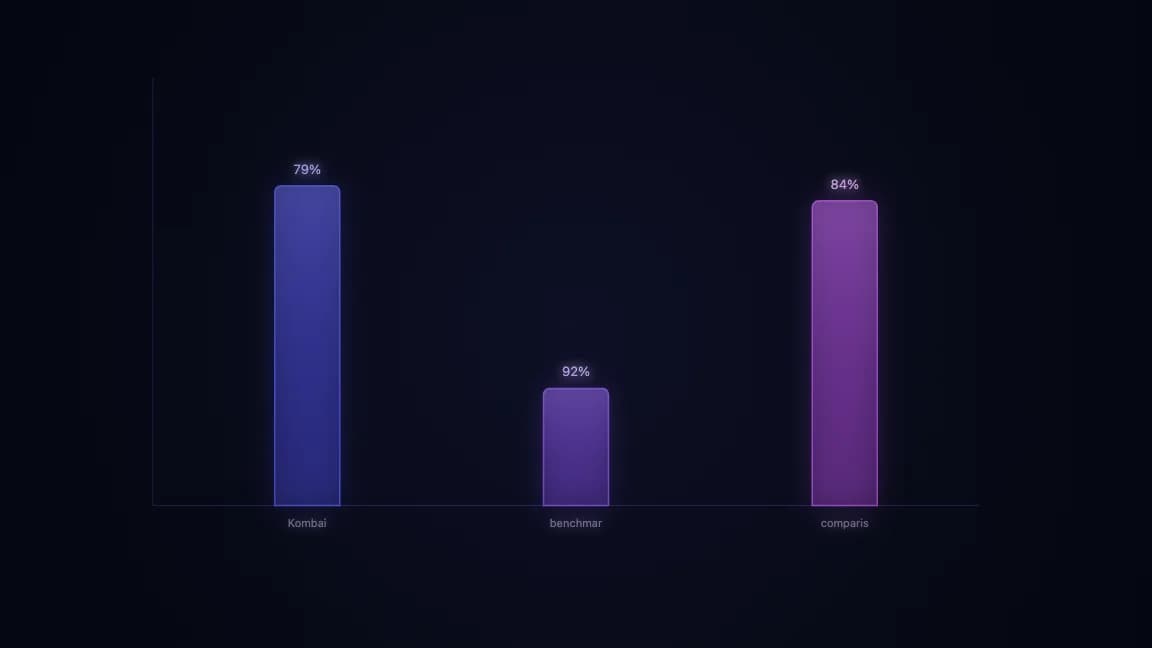
Most AI app builders suffer from the same problem: they all look identical. Linear gradients, thick fonts, emojis everywhere. Under the hood, they are typically powered by the same general-purpose models like Claude 4 Sonnet. Kombai takes a different approach. It is purpose-built for front-end development and claims to outperform both Claude 4 and Gemini 2.5 Pro on real-world FE tasks.
For the design side of the same problem, read What Is Claude Code? The Complete Guide for 2026 with 60 Claude Code Tips and Tricks for Power Users; they show how agent-generated interfaces fail and how to give coding agents better visual constraints.
Unlike tools designed for zero-to-one prototyping, Kombai is engineered to work within existing codebases. The platform integrates directly with Figma and allows you to specify exact frameworks, routers, and styling preferences rather than letting the LLM make arbitrary decisions.
Getting Started
Kombai installs as a VS Code extension and also supports Cursor and Windsurf. A free tier is available for testing. The onboarding includes example implementations across multiple UI libraries. You can preview outputs using shadcn/ui, Emotion, CSS Modules, or other styling approaches before committing to a specific stack.
The core value is control. Instead of accepting whatever the model generates, you define the constraints. Framework, router, component library, styling method, icon set. Kombai respects these boundaries.
Figma-to-Code Workflow
The primary workflow starts with a Figma file. After connecting your Figma account, you paste a link to a specific design selection. Kombai then presents a configuration panel:
- Framework: Next.js, React, Vue, etc.
- Router: App Router, TanStack Router, React Router
- UI Library: Material UI, shadcn/ui, Tailwind
- Styling: Emotion, CSS Modules, custom, or none
- Icons: Heroicons, Font Awesome, etc.

Once configured, Kombai enters a planning phase. It analyzes the Figma file and generates a structured build plan covering navigation, hero sections, feature showcases, pricing tables, and other components. You can edit this plan before execution, adjusting copy, pricing, or layout details. The planning phase also extracts design tokens, colors, typography, and animation specifications directly from the Figma styles.
After approving the plan, Kombai generates the code. A side-by-side comparison with the original Figma reveals close alignment. Colors match the style guide. Fonts render correctly. Layouts respect the original spacing. Minor adjustments may be needed, but the starting point is significantly closer to the design than general-purpose models typically achieve.
Newsletter
Get the weekly deep dive
Tutorials on Claude Code, AI agents, and dev tools, delivered free every week.
From the archive
The Sandbox Advantage
A critical differentiator is Kombai's sandbox environment. Generated code runs in isolation before touching your actual repository. This prevents the common scenario where an AI agent modifies existing files and breaks working functionality.

You review the rendered output in the sandbox. If it meets requirements, you select which files and components to apply to your codebase. Deselect anything you do not want. Only then does Kombai write to your project files.
Working with Existing Codebases
Kombai also handles enhancements to existing applications. When you prompt it to add a feature, it first scans the repository to detect the tech stack, router, styling library, and component patterns. It then generates new components that match the existing aesthetic.
In the demo, adding a hero section to an expense-splitting application produced code that inherited the correct container styles, font sizes, and color schemes from the existing project. The sandbox preview confirmed the integration worked before any files were modified.
The Bottom Line
Kombai narrows the scope to front-end implementation and excels within those constraints. The Figma integration preserves design intent. The sandbox prevents regression. The stack-aware generation maintains consistency across a codebase.
As the underlying language models improve, Kombai's specialized orchestration layer will compound those gains. For teams shipping production front-ends, it is worth testing against your current workflow.
Official Sources
| Resource | Link |
|---|---|
| Kombai Homepage | kombai.com |
| Kombai VS Code Extension | VS Code Marketplace |
| Kombai Documentation | docs.kombai.com |
| Kombai Figma Plugin | Figma Community |
| Kombai Blog | kombai.com/blog |
| Kombai on X | @AskKombai |
FAQ
What is Kombai and how does it differ from other AI coding tools?
Kombai is a purpose-built AI tool for front-end development that converts Figma designs to production-ready code. Unlike general-purpose AI builders that use the same underlying models, Kombai is specialized for front-end tasks and claims to outperform Claude 4 and Gemini 2.5 Pro on real-world FE benchmarks. The key differentiator is that Kombai works within existing codebases rather than only generating new projects from scratch.
Which editors and IDEs does Kombai support?
Kombai installs as a VS Code extension and also supports Cursor and Windsurf. The extension provides Figma integration, stack configuration, and sandbox preview capabilities directly in your editor. A free tier is available for testing the workflow before committing to a paid plan.
How does the Figma-to-code workflow work?
After connecting your Figma account, you paste a link to a specific design selection. Kombai presents a configuration panel where you specify your framework (Next.js, React, Vue), router (App Router, TanStack Router, React Router), UI library (Material UI, shadcn/ui, Tailwind), styling method (Emotion, CSS Modules, custom), and icon set (Heroicons, Font Awesome). Kombai then enters a planning phase, generates a structured build plan, and extracts design tokens directly from Figma styles before generating the code.
What is the sandbox environment and why does it matter?
The sandbox is a critical differentiator where generated code runs in isolation before touching your actual repository. This prevents the common AI coding scenario where an agent modifies existing files and breaks working functionality. You review the rendered output in the sandbox, select which files and components to apply, and only then does Kombai write to your project files.
Can Kombai work with existing codebases or only new projects?
Kombai handles both new designs and enhancements to existing applications. When adding features to an existing codebase, it first scans the repository to detect the tech stack, router, styling library, and component patterns. It then generates new components that match the existing aesthetic and coding conventions, maintaining consistency across the codebase.
Which UI libraries and frameworks does Kombai support?
Kombai supports major front-end frameworks including Next.js, React, and Vue. For UI libraries, it works with Material UI, shadcn/ui, Tailwind CSS, and others. Styling options include Emotion, CSS Modules, or custom approaches. The platform also supports various icon sets including Heroicons and Font Awesome. You configure these preferences before code generation begins.
How accurate is the design-to-code conversion?
The generated code closely aligns with the original Figma design - colors match the style guide, fonts render correctly, and layouts respect the original spacing. Minor adjustments may be needed, but the starting point is significantly closer to the design than general-purpose models typically achieve. The planning phase extracts design tokens, colors, typography, and animation specifications directly from Figma styles.
How does Kombai compare to v0, Bolt, or Lovable?
Kombai focuses specifically on front-end implementation with strong Figma integration, while tools like v0, Bolt, and Lovable are designed for zero-to-one prototyping of full applications. Kombai excels at preserving design intent from Figma, generating stack-aware code that matches existing projects, and providing sandbox isolation. It is optimized for teams that have designers creating Figma mockups and need accurate code conversion rather than AI-generated designs.
Watch the Video
Read next
Create Beautiful UI with Claude Code: The Style Guide Method
AI-generated interfaces tend to look the same - gradient-heavy, emoji-laden, and generic. The style guide method gives you a reusable design system that keeps every page consistent and on-brand, whet...
8 min readMagic Patterns: Why Design Wins in a World of AI Code Generators
Every AI-generated site looks the same. The gradients.
8 min readThe 10 Best AI Coding Tools in 2026
From terminal agents to cloud IDEs - these are the AI coding tools worth using for TypeScript development in 2026.
8 min readShare
Suggest an editSave
Developers Digest
Technical content at the intersection of AI and development. Building with AI agents, Claude Code, and modern dev tools - then showing you exactly how it works.
300+ videos30K+ GitHub stars50+ articles
Try These Tools
Related Tools
AI Coding

Aider
Open-source AI pair programming in your terminal. Works with any LLM - Claude, GPT, Gemini, local models. Git-aware ed...
View ToolProductivity
NotebookLM
Google's AI notebook that lets you ground a Gemini chat in your own uploaded sources. Generates summaries, mind maps, an...
View ToolAI CodingOpen source
OpenCode
Open-source AI coding agent for terminal, desktop, and IDE. Works with 75+ LLM providers including Claude, GPT, Gemini,...
View ToolAI Coding

Jules
Google's asynchronous coding agent. Point it at a GitHub repo, it clones to a cloud VM, plans with Gemini, and opens a p...
View ToolApps from Developers Digest
Developer Tools
Agent Hub
Every coding agent in one window. Stop alt-tabbing between Claude, Codex, and Cursor.
View AppDeveloper ToolsPlus $20/mo
Skills Pro
Unlock pro skills and share private collections with your team.
View AppDeveloper ToolsPlus $20/mo
Hookyard Pro
Pro hooks for Claude Code. Private bundles, team sync, one-click install.
View AppRelated Guides
Guide
Team Lead - Claude Code
Coordinator agent that assigns tasks and synthesizes findings.
Claude CodeGuide
Claude Code Setup Guide
Configure Claude Code for maximum productivity -- CLAUDE.md, sub-agents, MCP servers, and autonomous workflows.
AI AgentsGuide
Claude Code Complete Course
A complete, citation-backed Claude Code course with setup, prompting systems, MCP, CI, security, cost controls, and capstone workflows.
ai-developmentRelated Videos
Kombai: Unlocking Front-End Power. Beats Claude 4 and Gemini 2.5 Pro in FE tasks
In this video, we explore Kombai, a powerful platform transforming front-end development. Kombai enables seamless import of Figma designs and integration with widely used UI libraries and framework...
Video·
RunBear: Connect OpenAI, Claude & Gemini to Your Workplace Tools in Minutes
Sign up for Runbear with the below link to receive a 25% discount! https://runbear.io/?utm_source=developerdigest Coupon Code: DEVELOPERDIGEST Valid until February 2025 In this video, I demonstrat...
Video·
Zed: The Open Source Agentic IDE - Use Claude Code, Codex & Gemini CLI in one place
Check out Zed here! https://zed.dev In this video, we dive into Zed, a robust open source code editor that has recently introduced the Agent Client Protocol. This new open standard allows...
Video·
Related Posts

8 min read
Claude Code
Create Beautiful UI with Claude Code: The Style Guide Method
AI-generated interfaces tend to look the same - gradient-heavy, emoji-laden, and generic. The style guide method gives y...

8 min read
Magic Patterns
Magic Patterns: Why Design Wins in a World of AI Code Generators
Every AI-generated site looks the same. The gradients.
8 min read
AI Coding
The 10 Best AI Coding Tools in 2026
From terminal agents to cloud IDEs - these are the AI coding tools worth using for TypeScript development in 2026.

8 min read
CLI
10 CLI Tools Reshaping AI Development in 2026
From Claude Code to Gladia, the ten CLIs every AI-native developer should know. Install commands, trade-offs, and when t...
8 min read
Anthropic
Anthropic vs OpenAI: Developer Experience Compared
Two platforms, two philosophies. Here is how Anthropic and OpenAI compare on APIs, SDKs, documentation, pricing, and the...

14 min read
Claude Code
How to Use Claude Code with Next.js
A practical guide to using Claude Code in Next.js projects. CLAUDE.md config for App Router, common workflows, sub-agent...
Build with the member tools
Get Smarter About AI Dev
New tutorials, open-source projects, and deep dives on coding agents - delivered weekly.
One email per weekReal code, not theoryFree forever